THREE.DecalGeometry.js
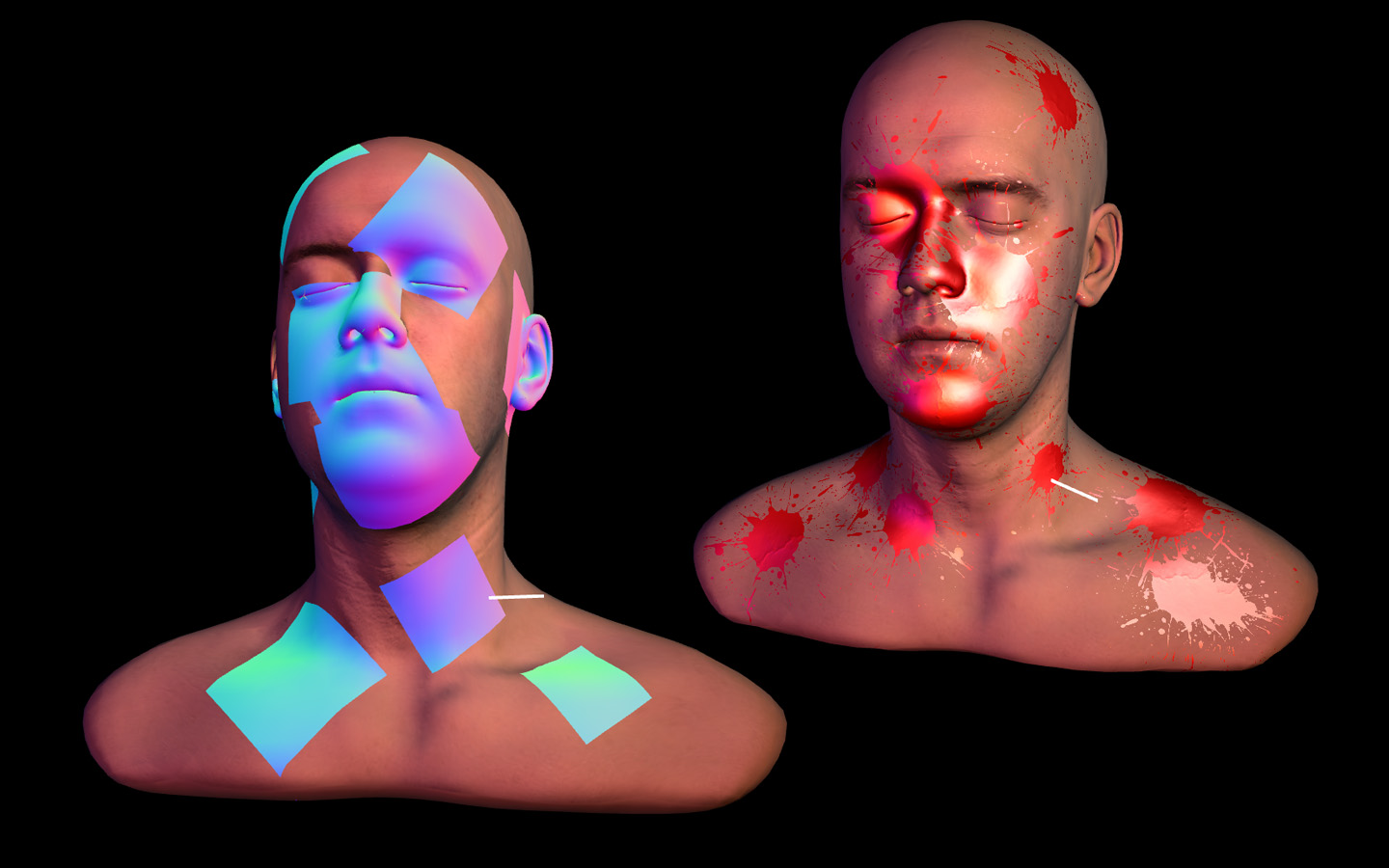
This object creates a decal geometry, intersecting a box against a mesh: the part of the mesh that is inside the box, with the texture coordinates to draw something over it. Based on this article How to project decals. It intersects a box against an arbitrary geometry and clips vertex coordinates and normals.
Demos
- Decal Splatter: click a head to shoot paint at it
- The box and what it cuts: every option, live. Move, turn and scale the box by hand, on a mesh that turns, one that morphs and one with bones, and stamp decals that stay on the mesh
2026 update
Disclaimer: this library is from 2014, and three.js has had it ever since: its decals example was added in r69 (2014) with this code, and DecalGeometry is in the addons, at three/addons/geometries/DecalGeometry.js. Use that one unless you need what this one adds
It gives the same decals as the one of three.js: the tests compare them. What this version has that that one doesn’t:
check, to choose which sides of the box clip the meshmaxAngle, to leave out the triangles that look away from the decal, or that are too much on their side to it. It’s what stops a decal from showing up on the other side of what it’s put on, and from stretching along the surfaces that it only grazeslocal, to get the decal in the coordinates of the mesh, so it can be added to the mesh and follow it when it movesupdate(), to make a decal again in the same geometry, without creating another one- meshes that are moved by their bones or their morphs are cut as they are at that moment, and so are the instances of an
InstancedMesh - it’s faster: in one test, on a mesh of 160000 triangles, a decal took 10 ms, and 83 ms with the one of three.js. A box that is away from the mesh takes no time
The library has been rewritten for current three.js, so code written for the 2014 version needs changes. What changed:
- it’s an ES module that exports
DecalGeometry, and it needs three.js asthree - it’s a
BufferGeometry, and it takes meshes with one.THREE.Geometry, that it was made of and for, is gone from three.js - the mesh can be anywhere: its position, rotation and scale in the world are used, and the ones of its parents. Only its own matrix was
- the normals of the decal are the ones of the mesh in the world. They were not rotated with the mesh
- most of the mesh is discarded before doing any work, and the decal has no triangles without area
rotationcan be aTHREE.Euler- a mesh that can’t be used, or a box without size, is an error that says so
- the demos run on current three.js, and the head is a glTF
How to use
It’s a single ES module, src/THREE.DecalGeometry.js, that needs three to resolve in your import map or bundler (see demo/splatter.html):
import * as THREE from 'three';
import { DecalGeometry } from './THREE.DecalGeometry.js';
Instantiate a geometry passing:
const decalGeometry = new DecalGeometry(
    meshToIntersect, // it has to be a THREE.Mesh
    position, // THREE.Vector3 in world coordinates
    rotation, // THREE.Euler specifying the orientation of the decal
    dimensions, // THREE.Vector3 specifying the size of the decal box
    options // optional: { check, maxAngle, local, instanceId }
);
and create a mesh using that geometry, as usual:
const mesh = new THREE.Mesh( decalGeometry, decalMaterial );
scene.add( mesh );
The geometry is in world coordinates, so add the decal to the scene, not to the mesh. To have it follow a mesh that moves, see local below.
The decal material can be any material, just make sure to have these attributes enabled:
const decalMaterial = new THREE.MeshNormalMaterial( {
    transparent: true,
    depthTest: true,
    depthWrite: false,
    polygonOffset: true,
    polygonOffsetFactor: -4,
} );
The box
The decal is what is inside of a box. position is its centre, dimensions its size and rotation how it’s turned. The texture is drawn along the x and the y of the box, from one side to the other, and z is how deep the decal goes into the mesh and out of it.
The z of the box should look out of the surface. To put a decal where a ray hits a mesh, an object that looks along the normal gives the rotation:
const hit = raycaster.intersectObject( mesh )[ 0 ];
const normal = hit.face.normal.clone().transformDirection( mesh.matrixWorld );

const helper = new THREE.Object3D();
helper.position.copy( hit.point );
helper.lookAt( hit.point.clone().add( normal ) );

// turn it around z to turn the texture
helper.rotation.z = Math.random() * 2 * Math.PI;

const geometry = new DecalGeometry( mesh, hit.point, helper.rotation, new THREE.Vector3( 10, 10, 10 ) );
Options
The fifth parameter is an object with any of these. For the code of 2014 it can also be check, as a THREE.Vector3, with the options after it.
check says which pairs of sides of the box clip the mesh, as a THREE.Vector3 with 1 or 0 for each one. With new THREE.Vector3( 1, 1, 0 ) the decal is not clipped along z, and goes through the whole mesh.
maxAngle is how far a triangle can be from facing the decal, in degrees, to be part of it. It’s 180 by default, which takes all of them. With 90 the ones that look away are left out, and with less than that, also the ones that are on their side to it:
const geometry = new DecalGeometry( mesh, position, rotation, dimensions, { maxAngle: 60 } );
local gives the decal in the coordinates of the mesh, not of the world. The box is still placed in the world, but the result is added to the mesh, and moves, turns and scales with it:
const geometry = new DecalGeometry( mesh, position, rotation, dimensions, { local: true } );

mesh.add( new THREE.Mesh( geometry, decalMaterial ) );
instanceId is which one to cut, when the mesh is a THREE.InstancedMesh.
A mesh that is moved by its bones or by its morphs is cut where it is at that moment. The decal doesn’t follow the animation after that: it’s a plain mesh.
Updating a decal
update() takes what the constructor does, and makes the decal again in the same geometry. Its buffers are only made again when the new decal doesn’t fit in them, so it’s the way to have a decal that moves:
const geometry = new DecalGeometry();
const decal = new THREE.Mesh( geometry, decalMaterial );
scene.add( decal );

function render() {

    geometry.update( mesh, position, rotation, dimensions );
    renderer.render( scene, camera );

}
Tests
test/index.html runs in the browser, from a server at the root of the repository. It checks the decals against known shapes, and against the ones of the DecalGeometry of three.js.
License
MIT licensed
Copyright (C) 2014 Jaume Sanchez Elias https://twitter.com/thespite Lee Perry Smith’s head model and textures by Infinite Realities
https://www.clicktorelease.com