SolariDisplay - A Split-Flap Display with CSS and JavaScript
Library to create a Split-Flap Display, or Solari Board, with CSS 3D transforms. Each flap goes through its values in order until it shows the one it was given, as the real ones do.
You can read the blog post here: Split-flap display with CSS and JavaScript.
Demos
- Basic: HELLO WORLD
- Text display: type something and watch the flaps catch up
- Single-digit clock: a flap for each digit
- Double-digit clock: a flap for the hours, and one for the minutes and the seconds, with 24 and 60 values
Move the pointer around to turn the board.
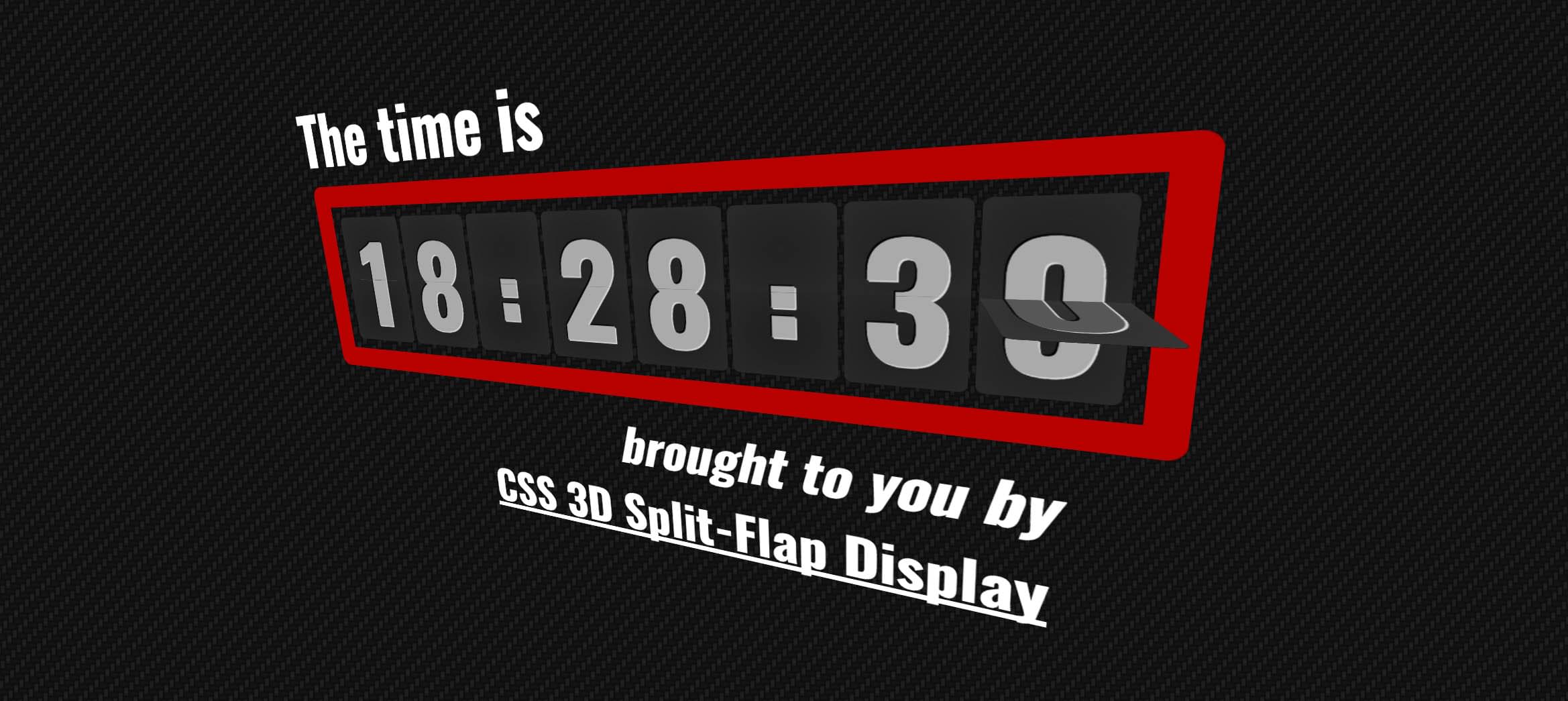
2026 update
Disclaimer: this library is from 2012. Browsers still have nothing like it built in, and it’s small, so it’s still a way to make one
It had stopped looking right: the perspective was written without a unit, -webkit-perspective: 400, which browsers don’t accept anymore, so the board had no depth and the flaps were drawn flat and skewed. It has been updated. What changed:
- the CSS uses the standard properties, without
-webkit-and-moz-, and the perspective is400px - it’s an ES module that exports
SolariBoard,SolariSegmentandSOLARI_VALUES, instead of theCTRglobal - it only animates while a flap is moving. It used to change the styles of every flap on every frame, forever
SOLARI_VALUES.hourgoes from 00 to 23, it had a 24- the options have defaults, there’s a
gapbetween flaps, and adispose() - the examples are modules, turn the board toward the pointer with pointer events, and load the font over https. The analytics script and the
requestAnimationFrameshims are gone - the build with Closure Compiler is gone, with its 5 MB jar: the source is small enough to use as it is
- it’s on GitHub Pages
Using the code
Copy src/SolariBoard.js and src/SolariBoard.css, include the CSS, and import the module:
<link href="SolariBoard.css" rel="stylesheet">
import { SolariBoard, SOLARI_VALUES } from './SolariBoard.js';
The display needs a container inside an element with the class displayBase, which gives it the perspective:
<div id="viewport" class="displayBase">
	<div id="container"></div>
</div>
#viewport, #container { position: absolute; left: 0; top: 0; right: 0; bottom: 0; }
#container { font-family: sans-serif; }
The board is centred in the container. Then create it, and give it something to show:
const display = new SolariBoard( {
	container: document.getElementById( 'container' ),
	format: Array( 11 ).fill( SOLARI_VALUES.letter ),
	segmentWidth: 70,
	segmentHeight: 120,
	fontSize: 100
} );

display.setContent( 'HELLO WORLD' );
The options are:
container: the element that the display goes informat: a list with an entry for each flap: the list of values it can show, or a string that it always shows, like':'. There are some lists ready to use:SOLARI_VALUES.letter: a space and A to ZSOLARI_VALUES.number: 0 to 9SOLARI_VALUES.hour: 00 to 23SOLARI_VALUES.minute: 00 to 59
segmentWidth: the width of a flap in pixels, 70 by default. A flap with values of two characters, like the hours, is twice as widesegmentHeight: the height of a flap in pixels, 120 by defaultfontSize: the size of the font in pixels, 100 by defaultgap: the space between flaps in pixels, 4 by default
setContent() takes a string, or a list with a value for each flap. A flap whose value is missing, or isn’t one of its values, goes to its first value, which is the space for letters:
display.setContent( [ '18', ':', '28', ':', '39' ] );
dispose() stops it and removes it from the page.
To turn the board, set a 3D transform on the container, like the examples do in examples/tilt.js.
License
MIT licensed
Copyright (C) 2012 Jaume Sanchez Elias, http://www.clicktorelease.com